FounderHQJun 28, 202611 min read
Email Sequences: A Practical Founder Guide to Follow-Up That Moves Users to the Next Step
Email sequences work best when they move one clear segment toward one meaningful next action. This guide shows early-stage founders how to plan, write, trigger, measure, and imp...

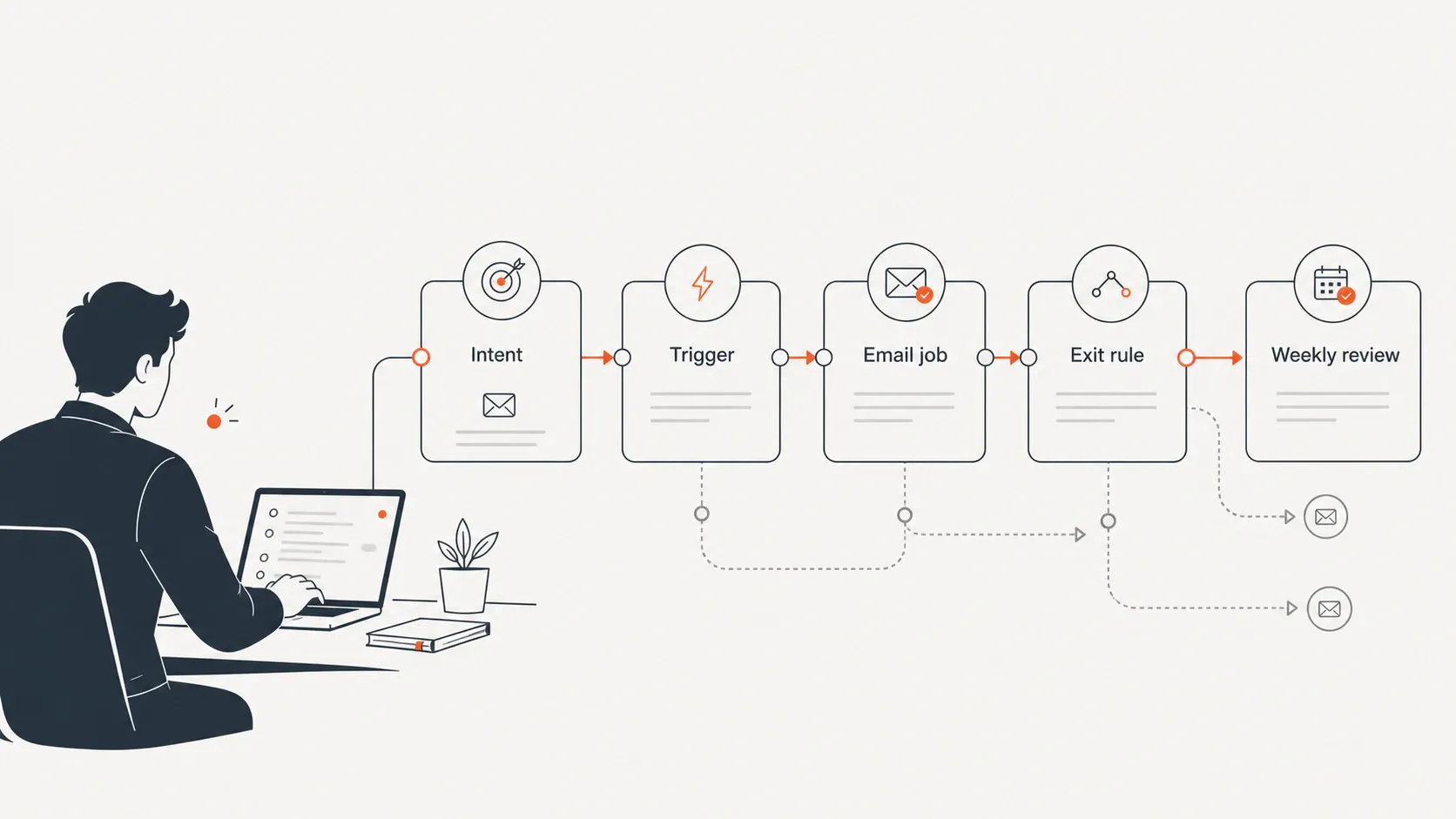
Email sequences are one of the simplest ways for an early-stage product team to keep momentum after a signup, waitlist join, demo request, product journey, or inactive period. The trap is treating them as either a generic drip calendar or a giant automation map. The useful middle path is smaller: choose one audience, define the next meaningful action, write one job per email, add exit rules, and review what users actually do next.
What are email sequences?
An email sequence is a planned series of automated emails sent to a specific audience segment. ActiveCampaign defines an email sequence as a series of emails automatically sent to specific segments, and notes that sequences can be trigger-based or time-based (ActiveCampaign). HubSpot similarly describes email sequences as automated emails sent to prospects, users, or customers through automation software, triggered by actions or time-based conditions (HubSpot).
For founders, the important word is not automated. It is specific. A sequence should exist because a specific person did something that creates a specific follow-up need: they joined a waitlist, signed up for a trial, answered a product-journey question, downloaded a guide, viewed pricing, stopped using the product, or replied with a problem.
Common email sequences include welcome sequences, onboarding email sequences, activation or trial follow-up, founder-led nurture, re-engagement, and customer education. The best sequence is not the longest one. It is the one that helps the user understand, believe, or do the next thing that matters.
Email sequences vs. drip campaigns, sales sequences, and automated email flows
The terms overlap, but founders make better decisions when the differences are clear. A drip campaign is often a time-based educational series. A sales sequence is usually prospect follow-up designed to move someone toward a reply, call, or decision. An automated email flow is broader lifecycle automation that may branch by behavior, product events, and sometimes other channels.
Term | Best use | Typical trigger | Founder risk |
|---|---|---|---|
Email sequence | Move a segment toward a defined next action | Signup, behavior, time delay, tag, journey answer | Writing generic emails with no goal |
Drip campaign | Educate or nurture over time | List join or content opt-in | Treating every lead the same |
Sales sequence | Follow up with prospects or accounts | Manual enrollment, demo request, outbound signal | Over-automating founder-led selling |
Automated email flow | Manage lifecycle moments with rules and branches | Product events, segments, inactivity, purchases | Building complexity before learning the pattern |
One-off campaign | Announce or promote something once | Manual send to a list or segment | Using blasts when behavior-based follow-up is needed |
Use the lightest term that matches the job. If a new user needs help reaching first value, build an onboarding sequence. If an inactive user needs a clear path back, build a re-engagement sequence. If a qualified prospect needs thoughtful founder follow-up, build a sales sequence rather than burying them in lifecycle automation. This guide focuses on email-sequence implementation for product-led follow-up; sales sequences and automated email flows deserve their own deeper operating guides.
The founder-first rule: start with the next meaningful action
Do not start with the tool, the template, or the number of emails. Start with this question: What should this person understand, believe, or do after this email? If you cannot answer that, the email probably belongs in a notes doc, not in a live sequence.
A meaningful next action might be:
- Confirm interest after joining a waitlist
- Complete account setup
- Reach the first value moment
- Reply with the main blocker
- Book a short call
- Return after inactivity
- Upgrade, invite a teammate, or try a key use case
This matters because product-led follow-up is not just brand awareness. It should support activation. MailerLite’s SaaS onboarding guidance emphasizes segmenting users before sending onboarding emails so recipients receive information that matches their needs and goals (MailerLite). That is the right instinct for small teams: relevance before volume.
The five email sequences most early-stage product teams actually need
1. Welcome sequence
A welcome email sequence sets expectations after someone signs up, joins a waitlist, downloads a resource, or completes a form. Its job is not to explain the entire company. It should confirm the context, restate the promise, and point the person toward one useful next step.
2. Onboarding sequence
An onboarding email sequence helps a new user reach the first meaningful product outcome. For a product-led team, this is where email supports the in-product journey rather than replacing it. If the user has already completed setup, the sequence should not keep telling them to set up.
3. Activation or trial sequence
A trial sequence should remove friction during evaluation. It can prompt setup, highlight one relevant use case, answer a common objection, or offer founder help before the evaluation window goes cold. The goal is not to squeeze every feature into the inbox; it is to help the user experience value.
4. Founder-led nurture sequence
A nurture sequence is useful when a lead is interested but not ready to buy, book, or commit. For early-stage founders, this is often where founder-led content, market education, and practical examples matter more than polished marketing claims.
5. Re-engagement sequence
A re-engagement sequence checks in with inactive signups or users and gives them a specific way back in. Avoid vague “we miss you” copy. A better email says, in effect: “Here is the fastest useful thing to try next, and here is how to tell us if this is not relevant anymore.”
How to build a lean email sequence in 7 steps
A lean sequence is easier to ship, easier to debug, and easier to improve. Use the seven-step flow below before you write copy. It keeps the system focused on user movement rather than automation theater.
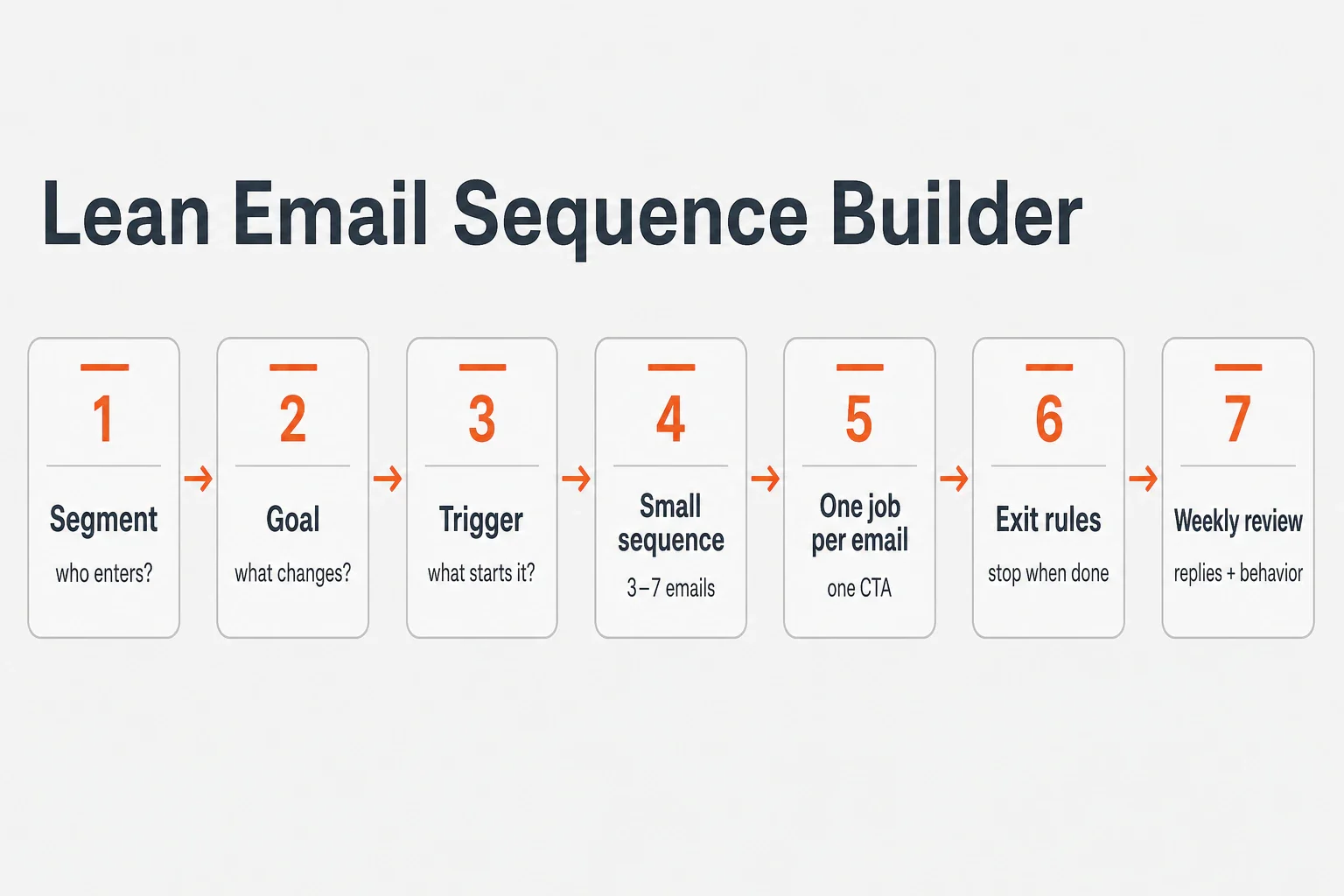
Step 1: Choose one audience segment
Pick one group: waitlist leads, new trial users, demo requests, inactive signups, product-journey respondents, or users who reached one milestone but not the next. If two groups need different reasons to act, they need different sequences.
Step 2: Define the goal and exit condition
Write the goal before the emails. Example: “New trial users create their first project.” Then define the exit condition: “Stop this sequence once the first project is created.” Exit rules protect user trust because people stop receiving irrelevant follow-up once they have done the thing.
Step 3: Map the trigger
Triggers can be time-based, behavior-based, or manually applied. Examples include signup, journey completion, no login after a set period, no activation event, pricing-page visit, a founder-added tag, or a direct reply.
Step 4: Draft the smallest useful sequence
For welcome or nurture, 3 to 5 emails is often enough to learn. For onboarding or trial follow-up, 5 to 7 may be reasonable when the product requires more education. Treat these as starting points, not universal rules.
Step 5: Give each email one job
An email can orient, prompt setup, handle one objection, show one use case, ask for a reply, or re-engage. When one message tries to do all of those, the user has to decide what matters. That usually weakens the sequence.
Step 6: Add suppression and exit rules
Suppress unsubscribed contacts, users who already reached the goal, people who replied, and segments that no longer match. If the sequence is built around contact data, product behavior, or integrations, responsible data handling matters; review your own policies and user expectations before shipping. FounderHQ’s own responsible data handling expectations are described in its Privacy Policy.
Step 7: Review weekly
Every week, ask: Which email earned replies? Which CTA caused action? Where did users stop? Which objection keeps appearing? Which segment needs a different message? This is where a sequence becomes a learning loop instead of a set-and-forget asset.
A simple email sequence template founders can adapt
Here is a practical five-email structure for a product signup. Adjust timing based on product complexity, user intent, and whether the person is actively evaluating now or casually exploring.
Timing | Job | Example CTA | Exit or branch logic | |
|---|---|---|---|---|
1. Welcome + expectations | Immediately | Confirm signup context and show the fastest path forward | “Start setup” | Stop setup prompts if setup is complete |
2. First-value prompt | Day 1 | Move the user to the first meaningful product action | “Create your first project” | Skip if first-value event already happened |
3. Friction remover | Day 3 | Address the most common setup blocker | “Reply with what is stuck” | Route replies to founder or operator |
4. Use-case example | Day 5 or 7 | Show one practical workflow the user can copy | “Try this workflow” | Branch by role, use case, or journey answer |
5. Check-in or next step | Day 10 or 14 | Ask for a reply, offer help, or move to the next lifecycle moment | “Want help mapping this?” | Stop if user replies, activates, or opts out |
Example: imagine a founder is launching a lightweight product-research tool and a waitlist lead says their main problem is “organizing customer interview notes.” The sequence could send: an immediate note confirming the problem, a day-one prompt to create the first interview workspace, a day-three friction email asking what is blocking setup, a day-five example showing how one interview becomes a tagged insight, and a day-ten founder check-in asking whether the workflow matches how they already take notes. That is not a case study or a promised result; it is a simple way to make the sequence follow the user’s stated intent.
Short copy usually wins for early teams because it forces clarity. A founder-readable sequence might sound like this: “You signed up to solve X. The fastest useful first step is Y. If Y is not the right next step, reply and tell me what you are trying to do instead.”
The key is not copying the table exactly. The key is preserving the operating logic: one segment, one goal, one trigger, one job per email, and one exit rule.
What to measure without drowning in dashboards
Email metrics are useful, but only if they match the sequence goal. Open rate can give directional signal, but it should not be the scoreboard for product-led follow-up. Prioritize clicks, replies, activation events, completed setup, booked calls, return activity, unsubscribes, and the qualitative objections users send back.
Benchmarks can provide context, not promises. Mailchimp reports all-user benchmark averages of 35.63% open rate, 2.62% click rate, and 0.22% unsubscribe rate across its benchmark table (Mailchimp). Campaign Monitor notes that good open rates and click-through rates vary by industry, and gives broad ranges of 17–28% for open rates and 2–5% for click-through rates depending on the industry (Campaign Monitor).
For a founder, the better question is: Did this sequence move the user? Measure activation for onboarding, replies for founder-led nurture, conversion events for trial follow-up, and return behavior for re-engagement. If a message gets opened but does not move the user, it is not doing its job.
Common email sequence mistakes founders should avoid
The most common mistake is sending every signup the same calendar-based sequence regardless of source, intent, role, or behavior. A waitlist lead, a pricing-page visitor, and a trial user who invited a teammate are not in the same moment.
Other mistakes show up quickly:
- Writing feature tours instead of next-step prompts
- Including three or four CTAs in one message
- Continuing to email users after they have already reached the goal
- Measuring only opens instead of downstream behavior and replies
- Over-automating before the founder has manually learned the real objections
- Forgetting unsubscribe, suppression, and preference expectations
A good early sequence should feel like a thoughtful founder following up at the right time. If it feels like the user was dropped into a machine that cannot see what they already did, simplify the system.
Where FounderHQ fits in the workflow
FounderHQ is a unified growth stack for early-stage product teams that helps teams build product journeys, compose founder-led content, and keep company context in one focused operating system. That matters for email sequences because useful follow-up depends on context: what the user answered, what they need next, what the founder has learned, and which message should stay consistent across the growth loop.
In a practical workflow, product journeys can capture intent and answers, company context can preserve the messaging, and the team can turn those inputs into a sharper follow-up plan. The sequence itself should still be treated as an operating choice: prove the email logic with a clear segment, goal, and exit rule before expanding the system.
FounderHQ’s positioning is not “automation replaces the founder.” The stronger operating model is founder leverage: sharper assets, faster workflows, and less blank-page work.
Email sequence checklist before you ship
Use this checklist before turning on a sequence:
- The audience segment is clear
- The trigger is clear
- The goal and exit rule are clear
- Each email has one job
- Each email has one primary CTA
- The message reflects the user’s context, source, or behavior
- Suppression rules prevent irrelevant follow-up
- Unsubscribe and preference expectations are respected
- Replies have an owner
- Weekly review is assigned to a founder or operator
If you cannot check every item, do not add more emails. Tighten the sequence. For early-stage teams, the best follow-up system is usually the smallest one that creates learning and moves the user forward.
Conclusion
Email sequences are not a growth hack or a replacement for product work. They are a lightweight operating loop: understand the user’s moment, send the next useful message, stop when the goal is reached, and review what the behavior teaches you. Build them this way and they become more than automated follow-up — they become a practical system for onboarding, activation, nurture, and re-engagement.
Related articles
Application Onboarding Process: Definition, Steps, and When to Use It
A practical seven-step application onboarding process for moving new users from signup to first meaningful value without unnecessary setup or generic tours.
In-App Analytics for Onboarding: Definition, Metrics, and When to Use It
In-app analytics for onboarding turns events, funnels, segments, and user feedback into decisions about the path from signup to first value.
In-App Guidance for Onboarding: Definition, Examples, and When to Use It
In-app guidance helps users complete meaningful tasks inside a product. This guide explains the main patterns and how to match each one to an onboarding blocker.